Her kommer en liten forklaring på hvordan vi bruker utstyret vi har lånt fra sponsorer, og KANDU sitt eget utstyr. PS: om bildene blir for små så kan man åpne bildet i ny tab, og fikse URL-en så man fjerner skaleringa >:-{D
Disclaimer
Her går det i norsk og english om eachother.
Dette er ikke en uttømmende oversikt, “ringen”, leveranser til crew o.l. er ikke tatt med her.
Wifi er ikke tatt med i stor grad
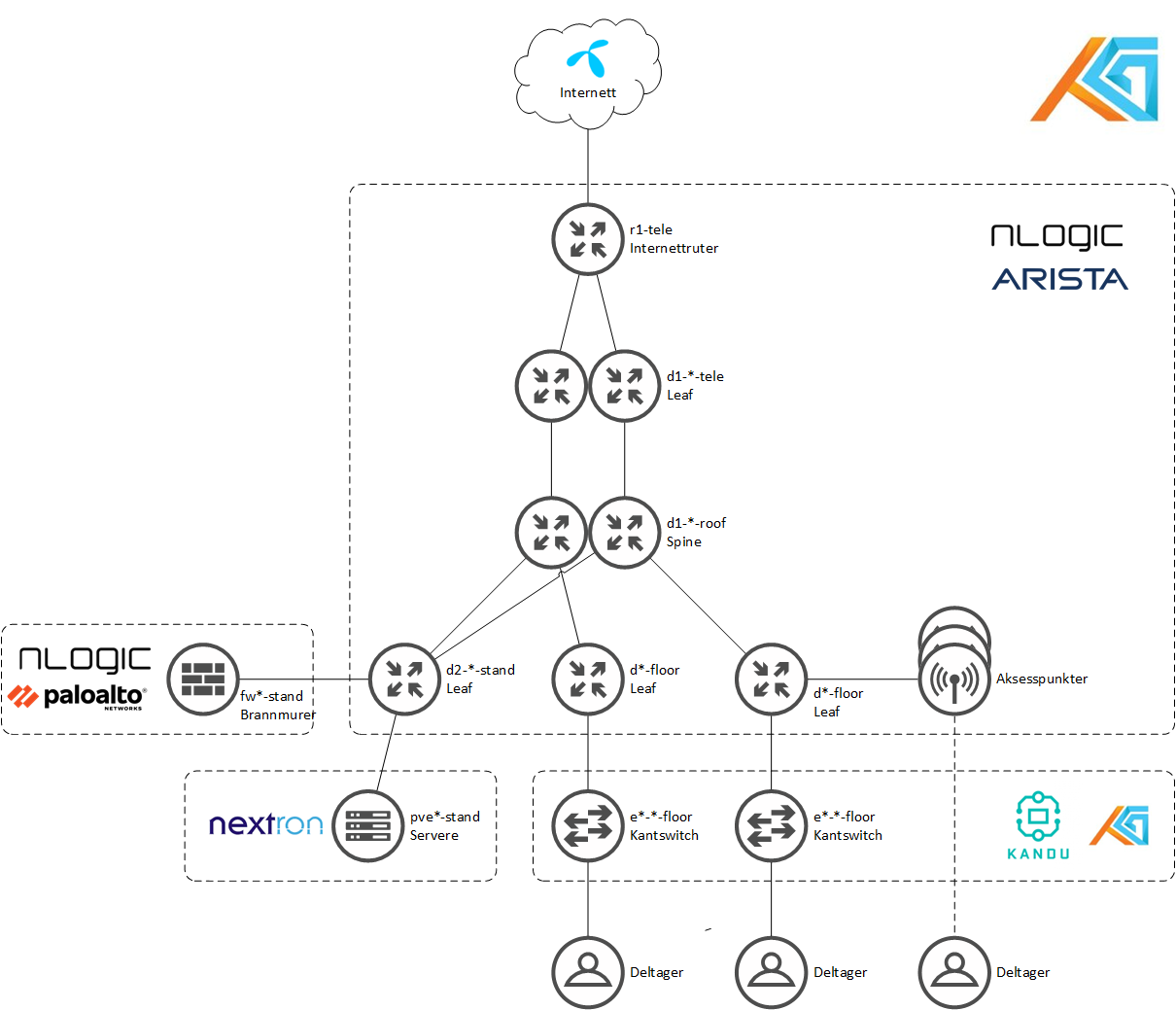
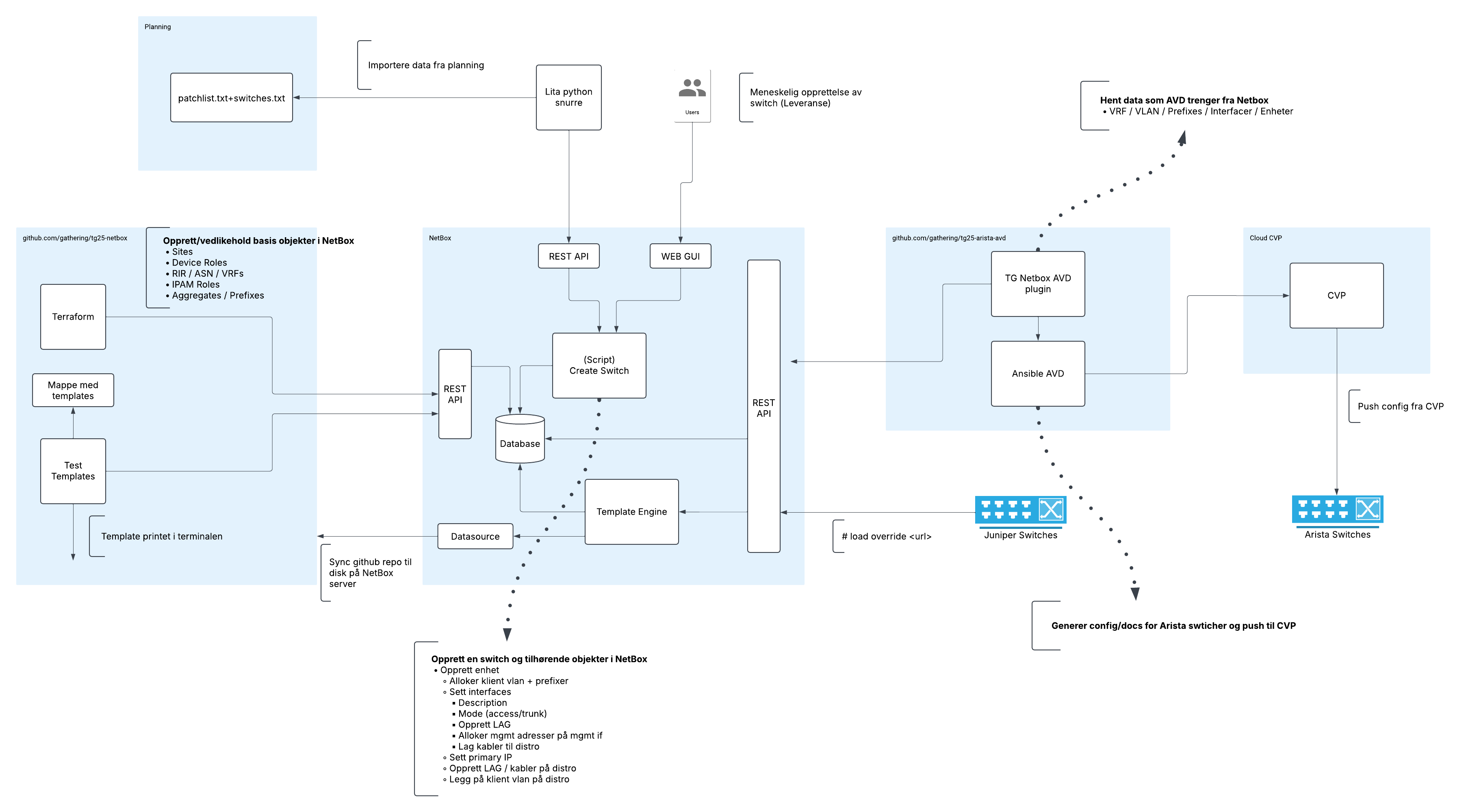
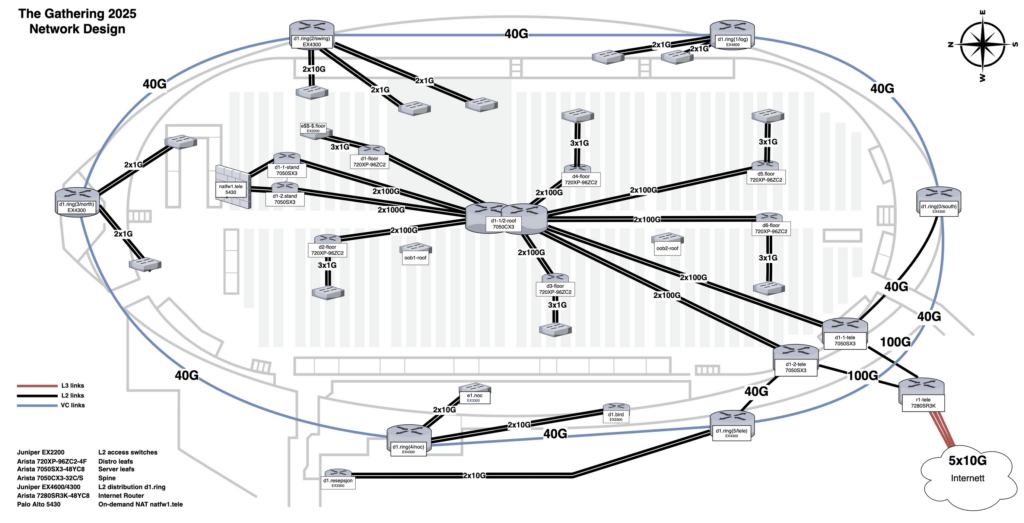
Først en tegning
Hva som har blitt levert, og hvordan vi bruker det
Arista har levert utstyr til å bygge en lag 3 spine/leaf-arktitektur, bestående av 2 x spines (d1-*-roof, Arista DCS-7050CX3-32S, plassert oppe i taket) og litt forskjellige type leafs alt ettersom hva vi trenger hvor. denne arkitekturen går gjerne under navnet “fabricen” (fæbriken!) i NOC-en.
Arista CCS-720XP-96ZC2 leafs brukt som distroer på gulvet (d*-floor)
Arista DCS-7050SX3-48YC8 leafs brukt som distro/aksess i stand (d2-*-stand)
Arista DCS-7280SR3K-48YC8 stand-alone, brukt som internettrutere
Arista 7010TX-48-F switcher brukt til out-of-band management med flatt lag2-nettverk
Arista AP-C460/AP-C360/AP-C260 aksesspunkter
Noen bokser brukt som aksess-switcher for spesialfunksjoner som gamecompo o.l.
Palo Alto leverer brannmurer som vi ruter all deltagertrafikk igjennom. Vi har et sett med PA-5430 brannmurer, som vi har satt opp i cluster. Vi bruker det til litt forskjellige ting, som bl.a.:
Beskytte deltagere mot “known malicious” adresser på nettet. Vi ønsker ikke at deltagere sin virusinfiserte maskin skal få kontakte botnets for å bli med angrep, eller at man fra infiserte nettsider skal bli sendt til adresser som sprer gøgg
Vi gjør v4-NAT, slik at vi kan holde oss til å bruke KANDU sine v4-adresser
Vi henter ut data som vi grafer og lager stats av. Som hvor mye trafikk som går til Steam, og hvilke land vi kommusierer mest med i skipet
GlobalFiber leverer den optikken som KANDU selv ikke har. Det gjør at vi har plenty med 100G, 25G og 10G optikk når vi finner på nettverkssprell.
Nextron leverer servere, som gjør at vi kan hoste og produsere mye av innholdet og de funksjonene vi trenger, og kule ting som å dele ut VM-er til deltagere som har lyst til å leke med linux.
nLogic er paraplyen som leverer “pakken” av Palo Alto, GlobalFiber og Arista, som muliggjør The Gathering i 2025
PS: Grunnen til at vi fremhever våre sponsorer er at TG ikke hadde gått å arrangere uten. Vi er avhengige av å få spons for å kunne arrangere og bygge det vi bygger, og da er vi heldige med velvillige og gode sponsorer som leverer heftig utstyr. Utstyret vi låner har markedsverdi på mange millioner kroner, og er helt i toppsjiktet av infrastruktur.
Q&A
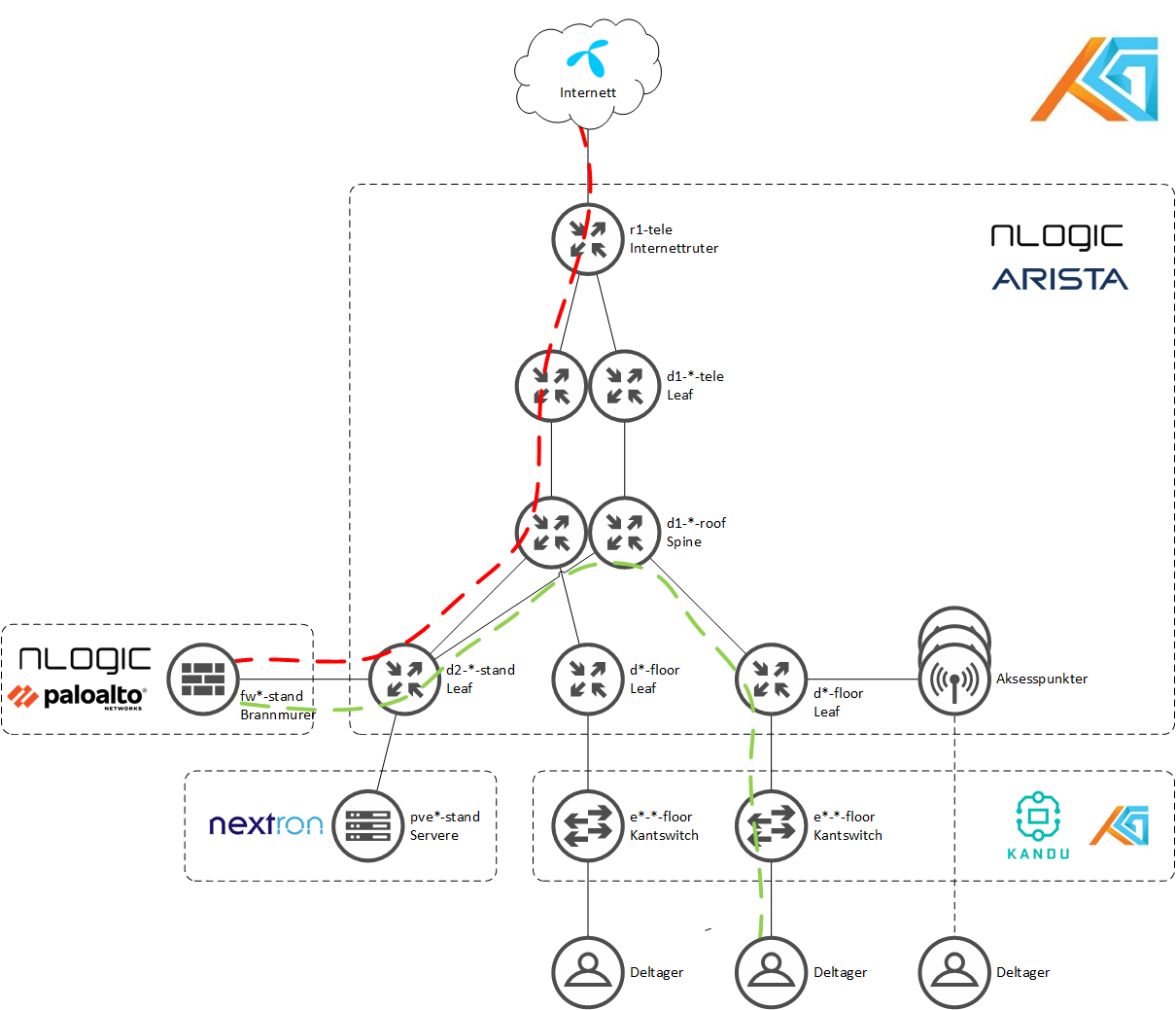
Hvordan flyter trafikken min fra min PC til internett?
IPv4 og IPv6 rutes samme path. I fabricen har vi flere VRF-er, for å separere ulike nett og selektivt kunne sende trafikk gjennom brannmurclusteret. Så en deltager befinner seg i CLIENTS VRF-et som rutes igjennom brannmurclusteret. Der gjøres source-NAT på IPv4, og sikkerhet for IPv4 og IPv6. Deretter rutes det videre til fabricen, men da inn i VRF-et INET. Derifra går det strake veien ut til Telenor/internett.
Hvorfor NAT-es jeg i år? Slik har det ikke vært før?
Av flere årsaker, der det viktigste er:
Promotere bruk av IPv6
Kun bruke KANDU sine offentlige IPv4-adresser. Det gjør at vi ikke opplever at adressene har blitt flyttet rundt og geolokalisert i ulike land til ulike tider. Vi har hatt Steam på Russisk et tidligere år, det unngår det problemet.
Moderne applikasjoner håndterer NAT helt fint
Men det er ikke utelukkende positivt. Det fører til at “ende til ende” kommunikasjon med IPv4 ikke fungerer. Men det gjør det på IPv6, så det er greit.
Hvorfor får min Iphone/Android-telefon kun IPv6-adresse?
Fordi vi bruker “IPv6 mostly”, som vil si at SLAAC i kombinasjon med DHCPv4 gjør at klienter som støtter det ikke vil få tildelt en brukbar IPv4-adresse. Klienten vil tunnelere trafikk som skal til IPv4-adresser i IPv6, og Paloene våre vil bruke NAT64 til å få trafikken frem.
Spørsmål?
Noe du vil vite mer om? Kom på Discord (#tech) og fortell om hva du vil vite, så skal vi prøve å fylle på med info her på bloggen 😀
Tech:nett har nå vært i skipet noen dager, og det er 21 timer igjen til deltagerne kommer brasende inn. 21 timer igjen til alt må fungere. Til tross for at vi har hatt ett døgn mindre å rigge på i år, så er vi godt i rute.
Hva har fungert bra
Mer eller mindre alt. Mye mindre kaos i templating i år kontra i fjor (TG-fjor…), kabeltrekking, Netbox for inventory er mer modent, eksisterende TG-fiber rundt i i skipet er gull. De nye som er tatt opp i tech:nett i år gjør en kjempeinnsats, og det er som om de har vært med å bygge TG i mange år.
Sponsorene våre (<3) har stått på, noen har vært her i flere dager alt, andre kommer i dag og blir litt utover påska. Her har vi tilgang til spisskompetanse på produkter og løsninger som er godt å ha.
Hva har fungert mindre bra
Dette er ikke nødnvigvis noe som ikke fungerer, men…
TG tech har alltid hatt en ganske stor grad av nettverksautomatisering. Datastrukturer og pipelines blir fort komplisert og uoversiktlig, og i år er vi enda mer (buzzword-warning!) datadrevet. Vi er en god miks av mennesker her, med forskjellig kompetanse. Man må være ganske utvikler-rettet for å henge med i alle kriker og kroker av hvordan litt JSON på en server blir til et VXLAN VNI spredd utover leaf-switchene i Arista IP-fabricen. Det fungerer ikke dårlig som et team, heller tvert imot, men noen av oss kjenner nok på at utvikler-delen av nettverk har en høy terskel for å jobbe i. Men det betyr også at mange i tech:nett utvikler seg enormt i løpet av TG.
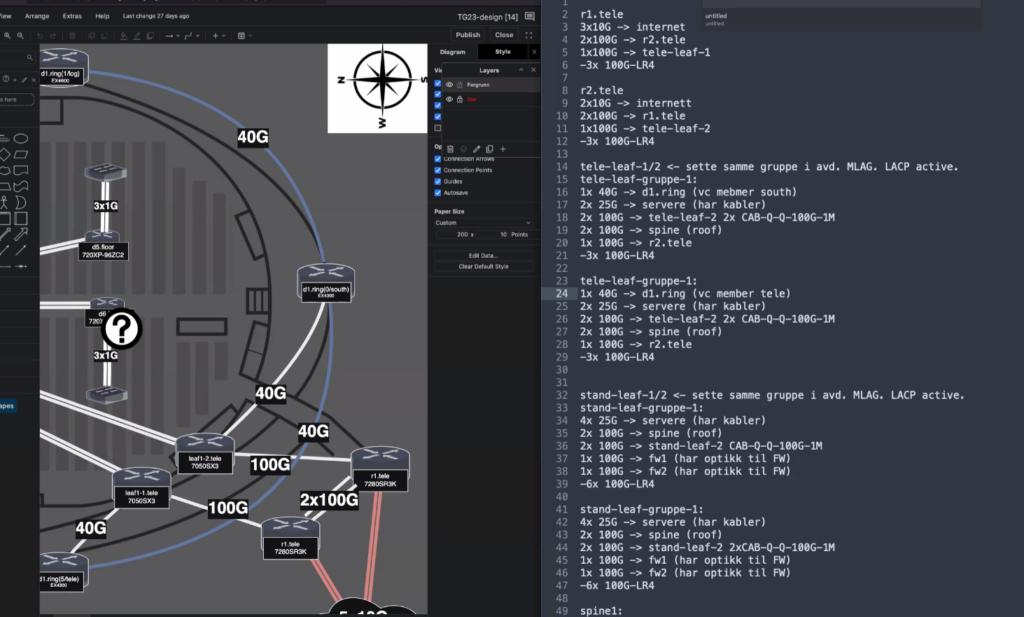
Her har vi noe(!) av dataflyten fra definisjoner til faktisk config/oppsett:
Hva skjer videre nå de neste timene
Det meste er oppe, bortsett fra “gulvet” (det området deltagerne sitter på). Det er det viktigste å få opp, samtidig som det er noe av det siste som kan settes opp. Alt er klart for at aksesswitchene på gulvet kobles til distroene i rackene ute i hallen, og autoprovisjonerer seg.
Ellers har vi noen leveranser igjen til ulike deler av crewfunksjoner, som f.eks. noen sponsorstands. Det må leveres.
I mange år har vi levert nettverk til distro-skapene våre ved å droppe en såkalt MPO-kabel (en type fiber multi-kabel) fra taket og ned til skapene i salen. I år har vi imidlertid støtt på en utfordring: det er økende bekymring for at disse kablene kan ryke, falle ned og potensielt skade noen under. Vi har derfor vært nødt til å se etter alternative løsninger.
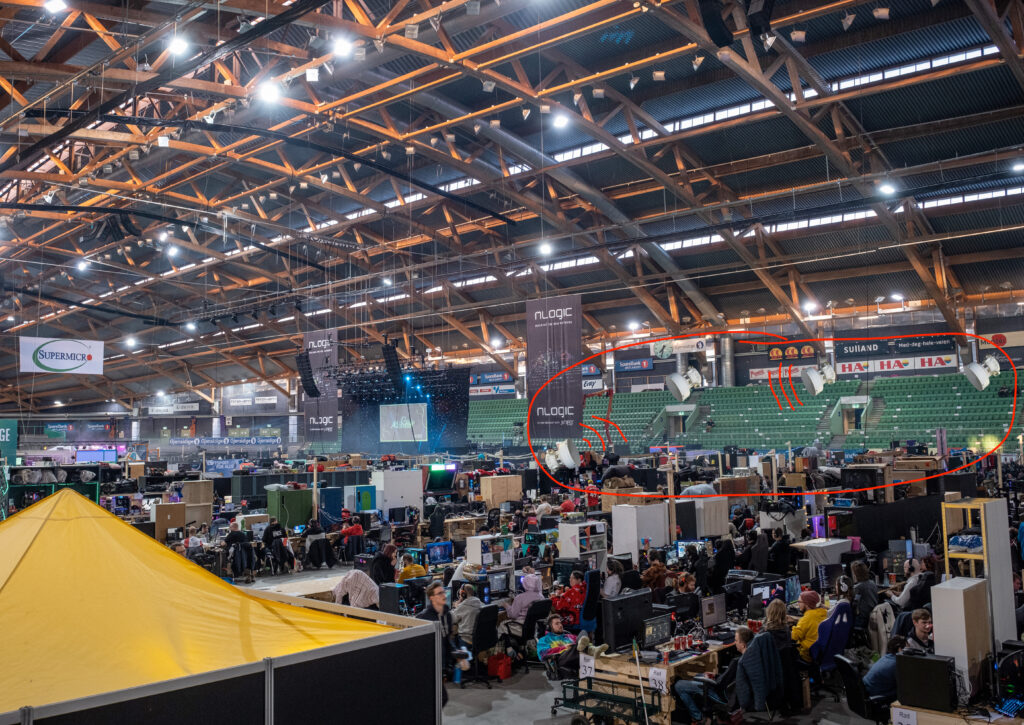
Etter mye om og men har vi landet på en ny metode: en 100 Gbit radioløsning, med en radio på hvert skap som kommuniserer med sin egen sender montert på tribunen. På denne måten slipper vi å bruke taket – og risikoen det medfører.
En skisse av hvordan løsningen kommer til å se ut i skipet
Vi tror dette kommer til å fungere bra, men for å sikre både ytelse og deltakernes sikkerhet, har vi vært nødt til å innføre noen nye regler:
Avstand til rackskapene
Radioløsningen vi bruker er svært kraftig for å kunne levere tilstrekkelig båndbredde, og er derfor ikke helt fri for stråling. Det er derfor viktig at man til enhver tid holder minst 2 meters avstand til skapene. En representant fra Tech:Støtte vil være til stede ved hvert skap til enhver tid for å påse at dette overholdes.
Radioløsningen krever også fri sikt mellom skapene og senderne, så Tech forbeholder seg retten til å gjøre nødvendige justeringer på hyller og utstyr som eventuelt skulle komme i veien for signalet.
Bruk av trådløse enheter
Trådløse enheter som mus, tastatur, hodetelefoner, mobiltelefoner og lignende kan forstyrre radioløsningen dersom de benytter frekvenser som overlapper med vårt utstyr. Det eneste som i utgangspunktet er tillatt å bruke trådløst, er nettet vi tilbyr sammen med nLogic – levert med utstyr fra Arista.
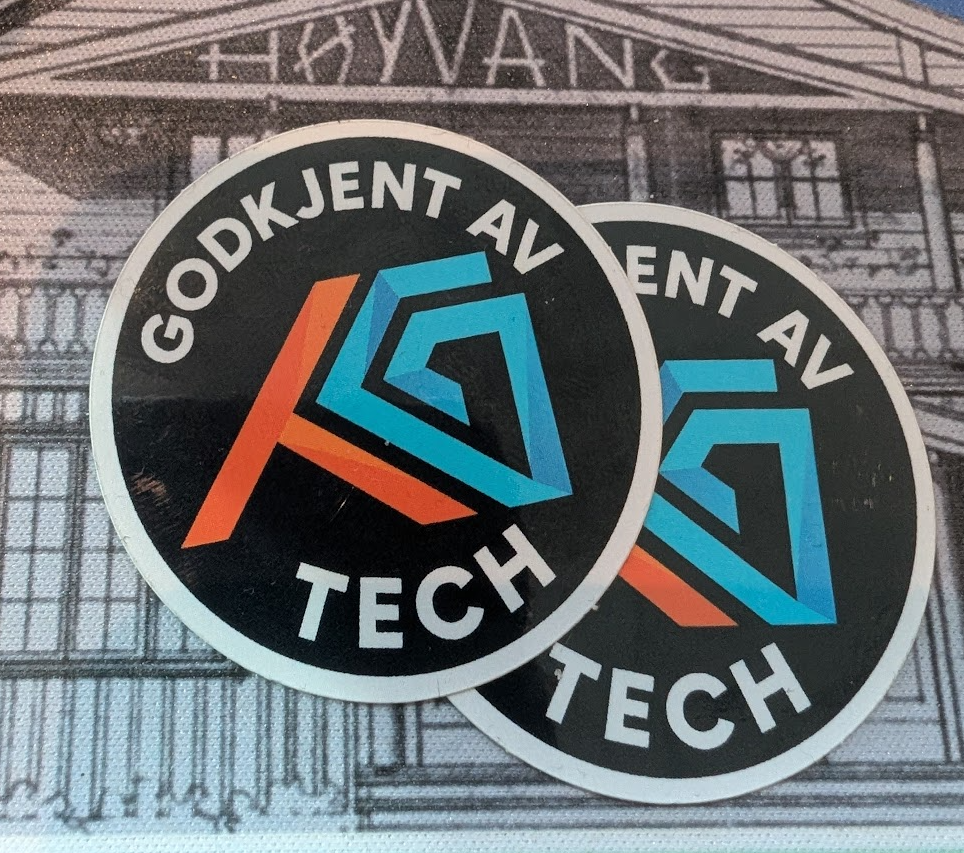
Dersom du trenger å bruke annet trådløst utstyr (ting som benytter Bluetooth, 2,4 GHz, 4G, 5G eller lignende), må du ved ankomst ta med enheten til Tech:Support i informasjonsdesken. Der vil vi sjekke om utstyret er kompatibelt eller om det kan forårsake forstyrrelser. Hvis det godkjennes, får enheten et «Godkjent av Tech»-klistremerke som gir deg tillatelse til å bruke den under arrangementet.
Lurer du på noe?
Har du spørsmål rundt dette? Ta gjerne kontakt med oss i #tech på Discord eller send en epost til tech@tg.no
Påsken nærmer seg, og vi har allerede delt nyheten om to store nye partnere i år. Nå kan vi med stor glede avsløre at enda en aktør ønsker å bli med på laget for å skape påskens beste nettverk!
Sammen med nLogic har vi samlet en fremoverlent gjeng av selskaper, alle med en felles visjon: å bygge Norges største midlertidige nettverk for en engasjert gruppe datainteresserte mennesker. Vi gleder oss til å vise hva vi kan få til – sammen!
I år har vi, sammen med nLogic, fått med oss Arista Networks, Palo Alto Networks og nå vår nyeste partner, GLOBALFiber. Denne sterke trekløveren stiller med store mengder nettverksutstyr, slik at vi kan bygge en solid og sikker spine-leaf IP-fabric med massevis av båndbredde – perfekt for å håndtere alle tjenestene deltakerne våre måtte ønske.
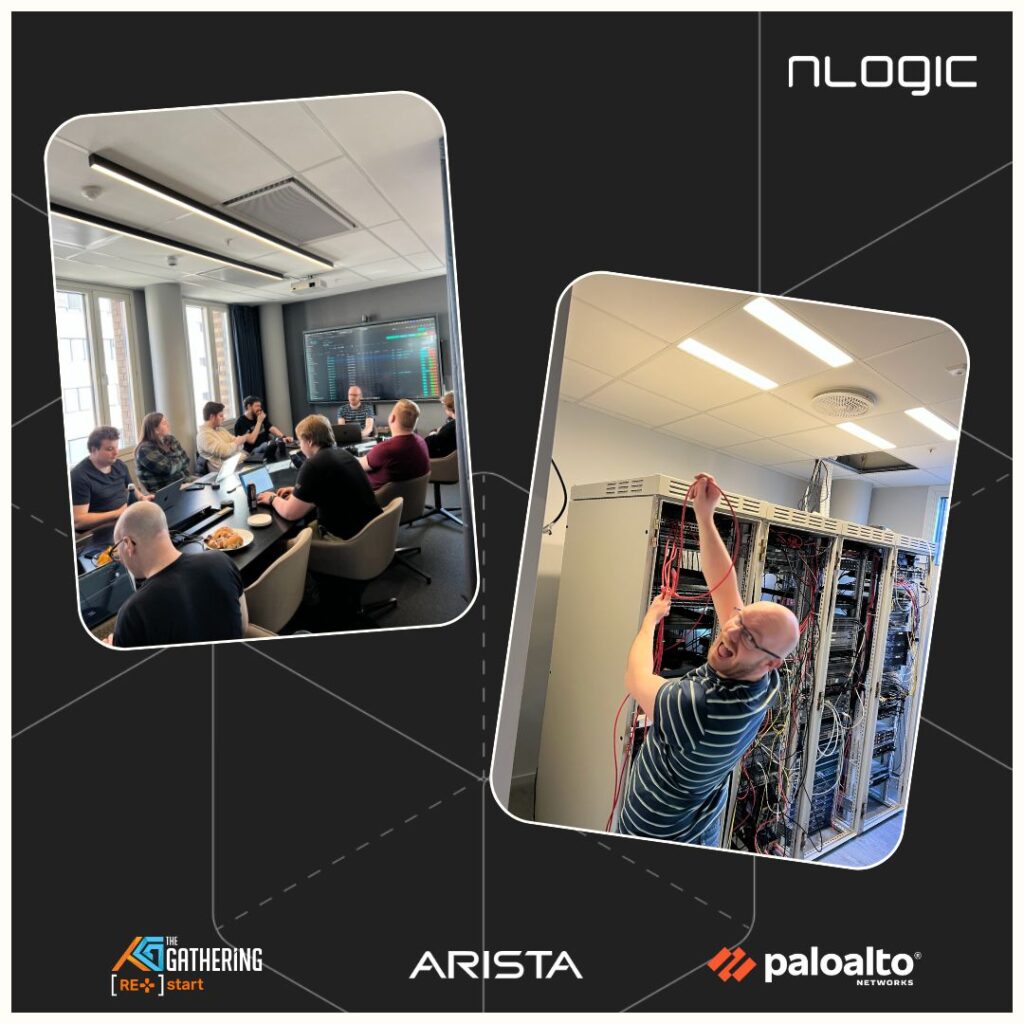
Utstyret som vi låner fra disse tre partnerne har nå ankommet Oslo og forrige helg samlet vi oss hos nLogic for en workshop. Der vi gikk gjennom det mottatte utstyret og startet arbeidet med å sette opp dette. Hvordan vi koblet inn brannmur og Internett ruter i spine-leaf fabricen var tematikk vi jobbet mye med for å finne de beste løsningene sammen med nLogic, Arista og Palo Alto.
Det er alltid spennende med nye partnere og innovative måter å bygge nettverk på! Spesielt samarbeidet med Arista Networks markerer en viktig overgang for oss i TG-sammenheng – fra et mer tradisjonelt nettverksdesign til en moderne spine-leaf IP-fabric.
Heldigvis tilbyr Arista kraftige verktøy som forenkler både konfigurasjonsbygging og deployment, slik at vi kan automatisere prosessen enkelt. Det er essensielt for å klare å rigge et nettverk som TG sitt på så kort tid. Til TG i år vil vi derfor lene oss tungt på Arista Validated Design (AVD), et sett med open-source Ansible Collections som gjør det enklere å bygge og administrere spine-leaf IP-fabrics.
Sammen med våres trofaste Netbox som sannhetskilde for nettverket vårt er, vi i stand til å rulle ut ny konfigurasjon på en enkel og trygg måte gjennom CI/CD pipelines. Dette kommer vi til å skrive mye mer om senere her på bloggen. Stikkord er Netbox, Netbox scripts, Ansible, Jinja templates og AVD. Om dette høres spennede ut, følg med videre på bloggen vår.
Nå står vår spine, et leaf-pair, Internett ruterene våre samt en VM host og snurrer i labben hos nLogic. Noe småting gjenstår før vi kan ta med oss disse enhetene og få dem på nett i Vikingskipet om et par ukers tid. Tusen takk til nLogic for lån av lokaler og fasiliteter for labbing.
Dette er designskissen vi jobber med å implementere:
Igjen takk til nLogic, Arista, Palo Alto og GLOBALFiber for at de er med oss å bygge noe helt nytt til TG.
Det er med stor sorg vi i dag mottok budskapet om at Berge Schwebs Bjørlo var en av de to som omkom i en skredulykke i Hemsedal forrige helg.
I perioden 2009 til 2014 bidro Berge både direkte og indirekte med sin dype tekniske kompetanse og ikke minst sin glade, optimistiske væremåte på The Gathering og i Tech:Server. Også i ettertid har mange av hans bidrag vært til stor nytte for arrangementet, de frivillige og deltakerne. Vi vil uttrykke stor takknemlighet for alt engasjement og alle bidrag.
Selv om det er noen år siden Berge var aktiv i The Gathering, er det ingen tvil om at han vil etterlate seg et stort tomrom – både hos oss og, ikke minst, hos alle andre som har hatt gleden av å lære ham å kjenne. Du vil bli savnet.
Alle våre tanker går til de omkomnes nærmeste familie og venner.
Planlegging av nettverket til The Gathering 2025 foregår nå for fullt. Nytt i år er nye sponsorer, som låner oss heftig utstyr og bistår oss med å komme i gang med utstyret deres.
Vi kommer tilbake med mye mer info når vi er klare for å dele. Enn så lenge, takk til Arista for stort engasjement og fleksibilitet, og Palo for lån av kule bokser!
Andre sponsorer, som alle gjør mye for oss, er Nextron, nLogic, Telenor og Nexthop.
La meg introdusere deg til crewet Info:Systemstøtte. Et relativt ukjent navn for mange, men crewet består av det gamle Info/Core:Systems og den tidligere Driftsgruppa.
Vi er et crew som har ansvar for stort og smått, og vi har et behov for søkere for TG25. Vi trenger folk som kan å programmere PHP, Python, Javascript/React eller noe annet spennende. I tillegg trenger vi UX-designere og mennesker som har lyst å jobbe med support.
Arbeidsoppgaver vil være utvikling av nettsider (TG.no), Wannabe (PHP/Laravel) og diverse andre støttesystemer (Python/Django), samt drift av diverse systemer og servere (Proxmox som virtualiseringsmiljø, Fortinet på nettverk og litt Kubernetes).
Høres dette ut som noe som kan være spennende for deg? Send en søknad på wannabe.gathering.org
En interessert Discord-bruker fyrte av noen gode innspill på hva vi kan skrive om på bloggen. Da følger vi opp, og prøver å skrive noe semifornuftig!
WAN-linken
VI har, som kanskje kjent, en 50 Gbit/s linje fra Telenor. Det er et sponsorat, der vi får kapasitet fra de, mot at vi reklamerer for de.
KANDU, arrangøren av TG, er en LIR hos RIPE. Det vil si at KANDU eier et AS-nummer, med tilknyttet IPv4 og IPv6-prefixer. Via Telenor kan vi annonsere de prefixene KANDU eier. I tillegg har vi fått låne et prefix fra RIPE, og et prefix fra Telenor. Vi har vært heldige, for dette er ingen selvfølge.
Til sammen har vi følgende prefixer vi kan annonsere:
88.92.0.0/17
185.110.148.0/22
151.216.128.0/17
2a06:5840::/29
Det tilsvarer ~65000 IPv4-adresser og ~32 milliarder /64-blokker (ja….)
For å forenkle håndteringen av den (både for Telenor og oss) har vi den levert som 5 x 10 Gbit i et linkaggregat.
Håndtering av DDoS
Vi lever dessverre i en verden der vi må være i stand til å håndtere DDoS. Vi har primært to metoder for å beskytte oss når vi trenger det, og mulighet til å “ringe en venn”.
DDoS-vasking i Telenor sitt nett. Det vil si at Telenor lytter på “flows” (rent volumetrisk), og om de ser en enorm økning av trafikk mot enkeltadresser kobles automagisk “vaskemaskina” til Telenor inn. Den vil da begynne å filtrere.
Vi har også klart ett oppsett for å utføre “remote triggered black hole” via BGP communities. Det gjør at vi enkelt kan ofre en IP-adresse i skipet, ved å via BGP å fortelle at Telenor skal droppe trafikken mot den adressen.
Vi har i tillegg alternativet å kontakte Telenor SOC-en for å håndtere hendelser individuelt.
Vi har noen fornuftige filtere hos Telenor for å police protokoller som er mye benyttet til “DDoS amplification attacks”.
NAT
“This is fine” av Gunshow
Vi vil ikke alltid ha muligheten til å låne IPv4-adresser. Vi ønsker å belage oss på å kun benytte KANDU sitt IPv4 prefix (~1000 adresser), og med det må vi begynne å bruke NAT på IPv4-adresser.
I år gjør vi noe litt utradisjonelt med NAT, med gode grunner.
NAT på wifi
Vi deler ut public adresser fra 151.216.144.0/20 til alle på wifi. Disse public-adressene blir igjen “source NAT-et” bak 85.110.150.0/25. Dette gjør at vi veldig enkelt, uten å vente på at DHCP-leases skal time ut, kan flytte hele nettet inn og ut av NAT.
NAT på kablet nett
Vi vil utover TG23 NAT’e halvparten av deltagerne som er koblet til “multirate 10G”-switchene. Dette for å kunne gjøre en A/B-test av hvor godt det fungerer.
I tillegg vil visse crew NAT-es. Vi får se hvem de heldige blir 🙂
Vi vil source NAT-e disse nettene bak 85.110.150.128/25
Notater om NAT
Vi NAT-er kun IPv4-trafikk
Vi NAT-er ikke trafikk internt i skipet. Kun trafikk som har destination-adresse utenfor skipet blir NAT-et.
Vi ønsker ikke å NAT-e, men ser det som en nødvendig onde. Vi bruker TG23 for å bygge erfaring.
natfw1.tele
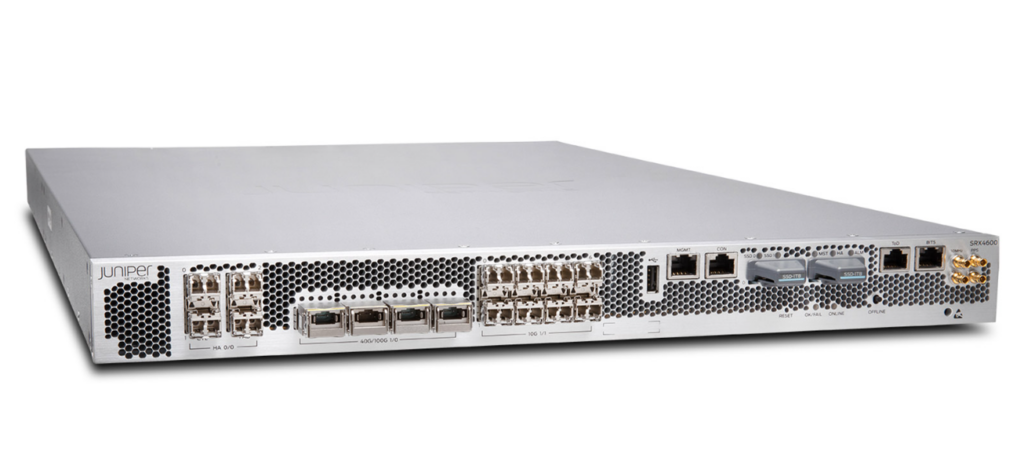
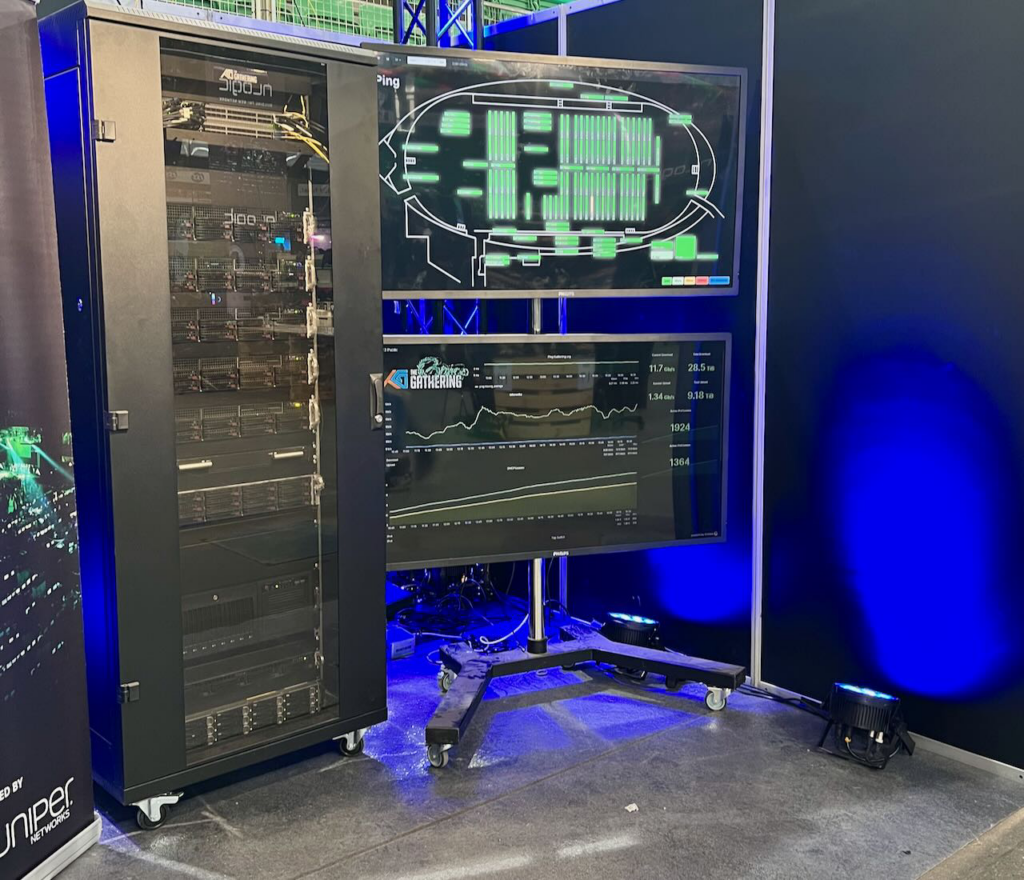
Dette er brannmurene vi bruker for å utføre NAT. Det er cluster med 2 x Juniper SRX4600, i et aktiv/passiv-oppsett. Herlighetene ser sånn ut:
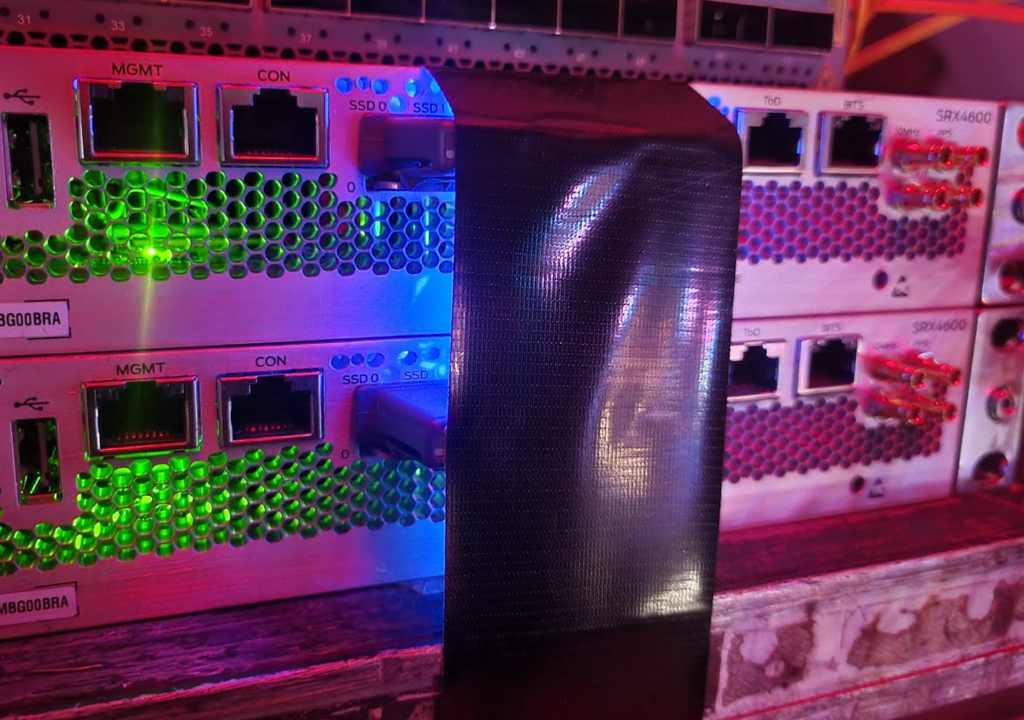
PS: Den ene SSD-en sitter veldig løst. _veldig_ løst. Og om man blir fristet til å kjenne etter hvor løst de sitter løst, så blir det stygg kræsj, og noden må formateres. Vi prøvde. To ganger. Så da kommer gaffa til unnsetning.
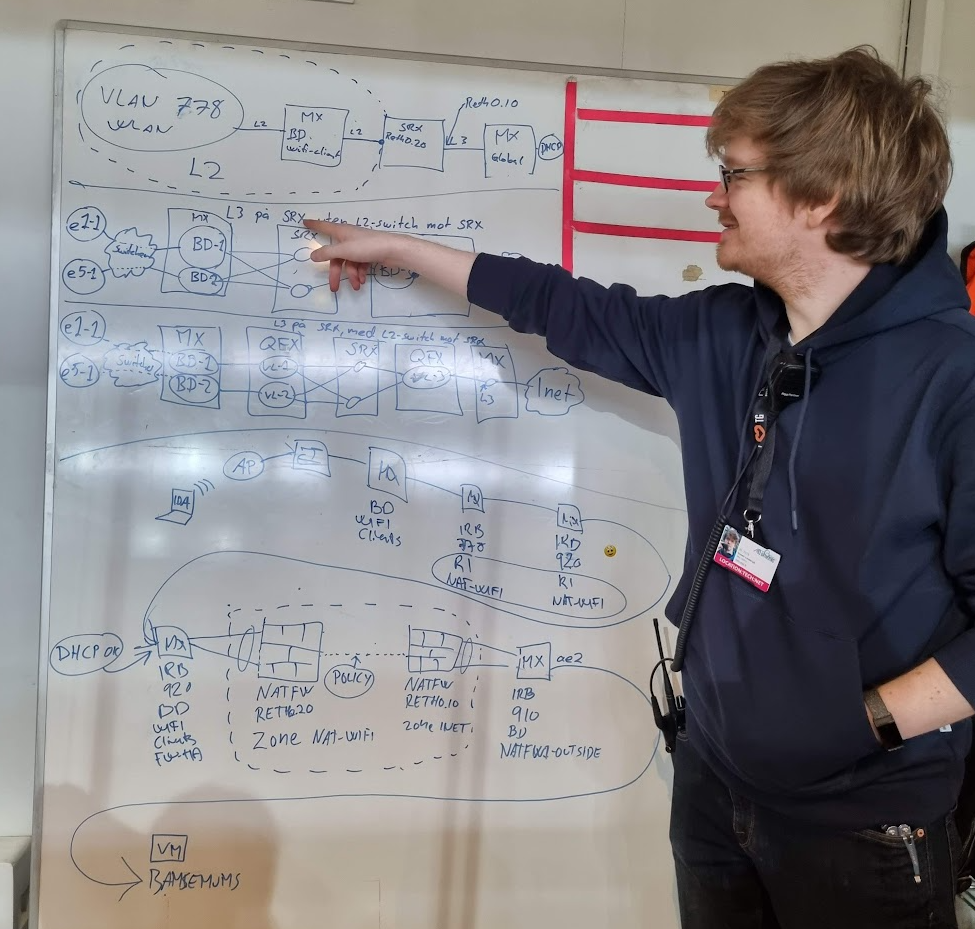
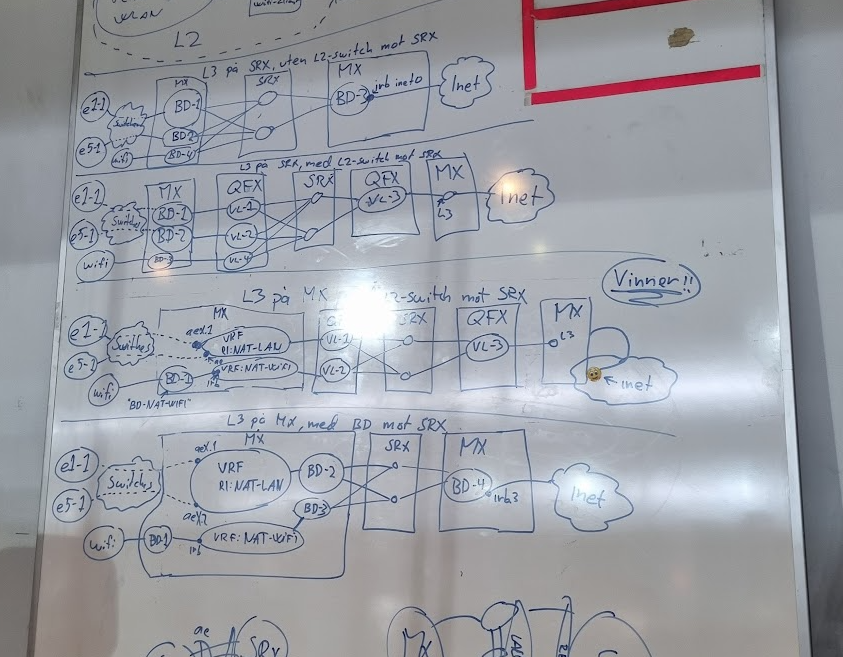
Det har vært litt frem og tilbake i designet, hovedsakelig rundt følgende
Skal vi terminere L3 for NAT-WIFI og NAT-LAN på r1.tele eller natfw1.tele?
Skal vi ha et “switchelag” mellom natfw1.tele og r1.tele?
Vi får til veldig mye rart, men med mange valg kommer det også en liten haug med pros and cons. Vi valgte å prioritere enkelhet i feilsøk (pga. at flere i tech:net skal kunne feilsøke og jobbe på løsningene), og at provisjoneringssystemene (fap-awx-gondul-tech-template-sammensuriumet) ikke skal bli mer kompliserte enn nødvendige.
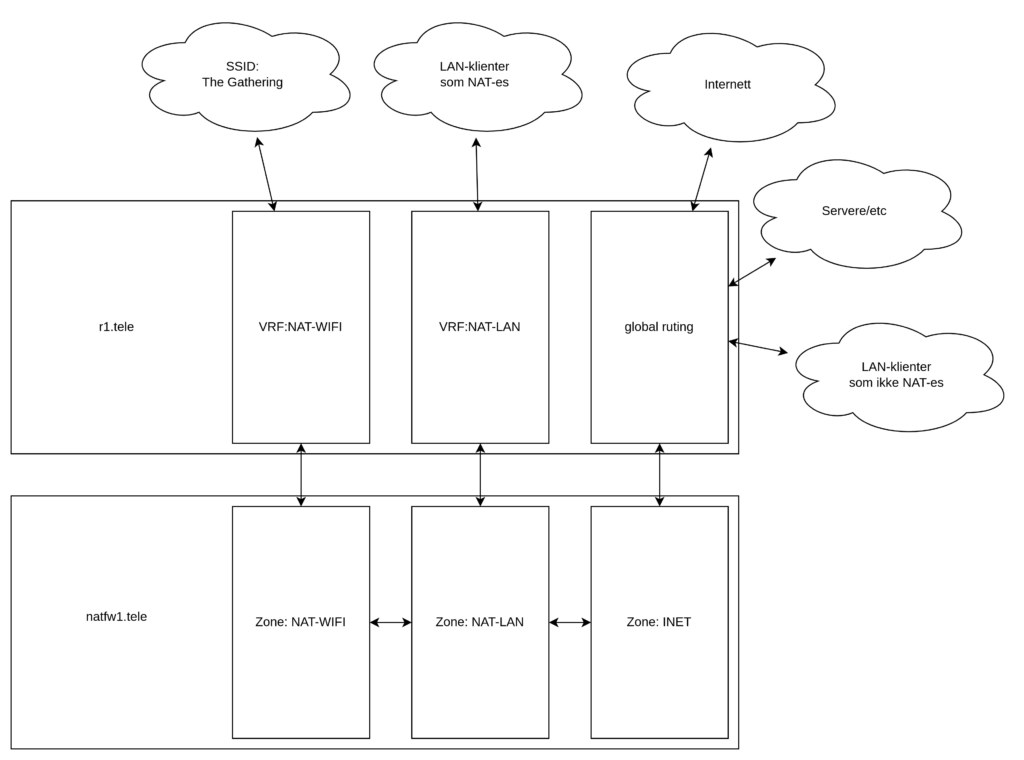
Løsningen rent logisk (L3) landet på å bli seende slik ut:
Dette gir oss muligheten til å med én enkelt configlinje velge om et nett skal NAT-es eller ikke. Enten termineres det i VRF:NAT-WIFI eller VRF:NAT-LAN (og dermed NAT-es), eller i “global”, og dermed ikke NAT-es.
Om nettet skal NAT-es styres med denne logikken via én tag i Netbox. Neat stuff!
Wifi vil Martin, med den tyngste Wifi-kompetansen, komme tilbake til 😀
10G til deltagerne kommer vi tilbake til når vi har fått summet oss, og samlet litt mer data. Hittil tilsier statistikken at det er mange med høy båndbredde på NIC-et, men at de gjerne kunne pushet en del mer trafikk. Distroene d1.floor og d2.floor har likt forbruk ingress, mens alle 10G-switchene til deltagerne henger på d1.floor.
Sjekk ut https://tgsp.tg23.gathering.org for å spinne opp din egen Linux VM som kjører på servere fra Nextron og er koblet rett på fibernettet til Telenor. Dette er et prøveprosjekt fra Tech så vi forventer litt problemer. Ikke vær redd for å ta kontakt med oss i Tech:Net for litt bistand. Du finner oss på Discord serveren under #tech.
Tech Stand
Merk at dette kun er et tilbud under The Gathering og alt blir slettet når arrangementet avsluttes..
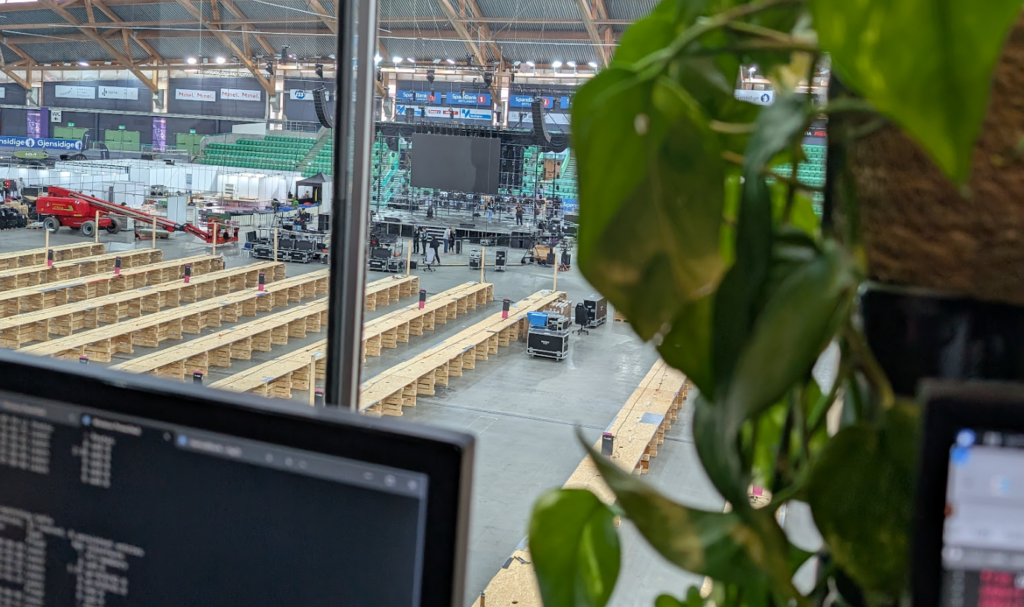
Deltagere strømmer inn i skipet og finner plassene sine. Vi tech:net ser utover gulvet, og i våre systemer, at vi nok et år har klart å lage et godt nettverk. (jinx’d!).
Dette får vi til pga. en super innsats fra crew, og pga. sponsorer som strekker seg langt ❤️
Jeg vil spesielt trekke frem tech:support, og deres enorme innsats i å håndterminere mange kilometer med nettverkskabel.
En liten (og langt ifra ukomplett) oversikt over hva som har gitt oss i tech:net hodebry under opprigg
Templating, og alle mulige cornercases som må løses på stående fot
DHCPv6 option 18 injection på en del nettverksswitcher, som gjorde at IPv6 DHCP fungerte dårlig på wifi de fleste steder i skipet. DHCPv6 option 18-pakker ble droppet på r1.tele
Redesign av NAT-løsninga flere ganger
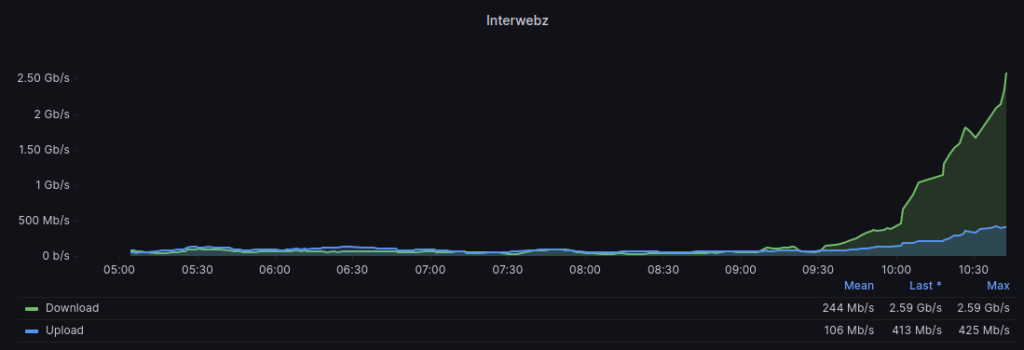
I skrivende stund har vi 657 IPv4-klienter og 370 IPv6-klienter på nett, som tygger unna rundt 2,5 Gbit/s ingress/0,5 Gbit egress 😎